Changelog

Follow new updates and improvements to Palera.

SMS Channel Configuration, Outbound SMS Conversation, Live Chat Downtime Management & More

New Features

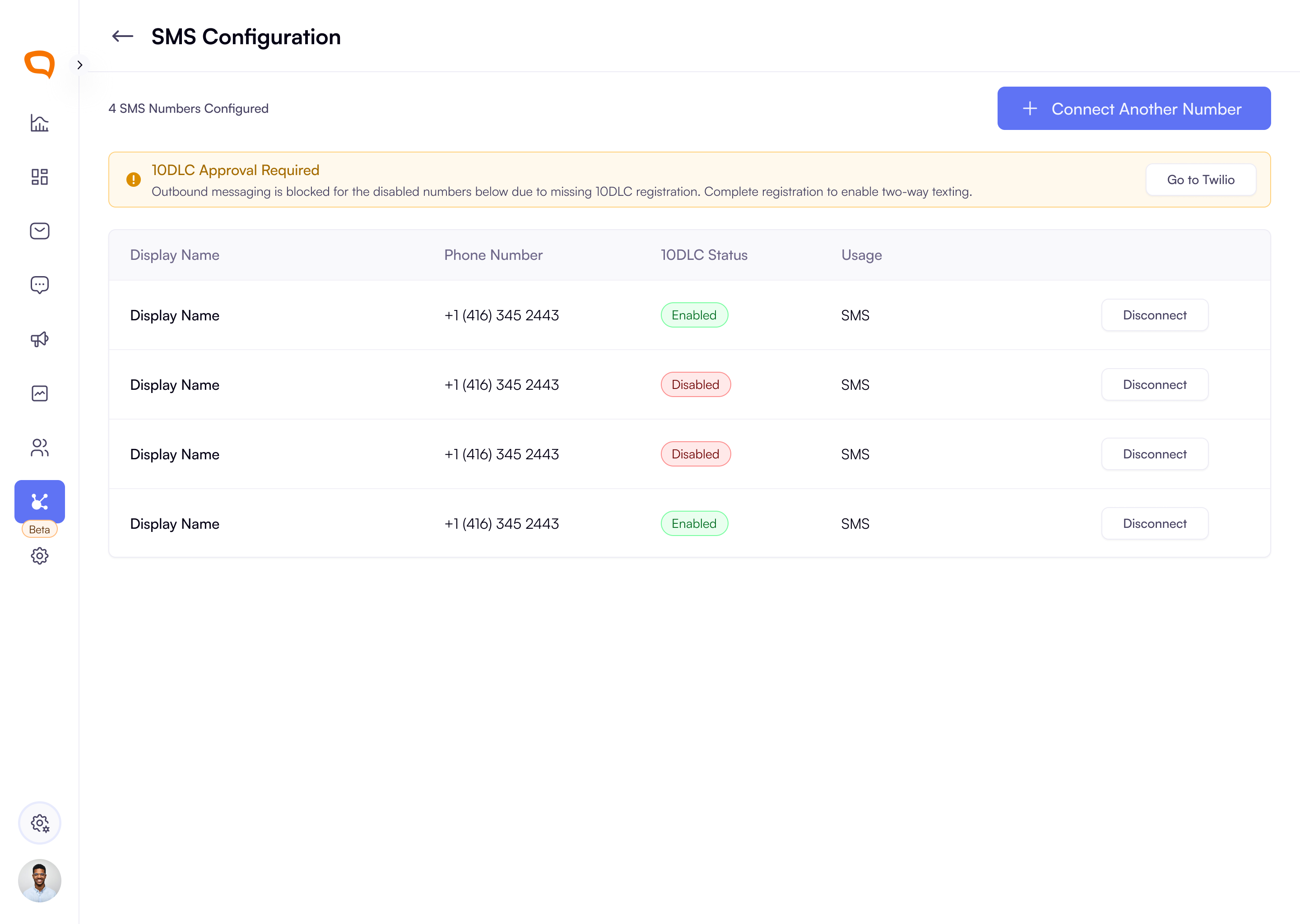
SMS Channel Setup and Number Management

Admins can now set up SMS in a more guided way, including a guide to connect Twilio credentials and completing SMS configuration with clearer steps.

  • You can now view available Twilio numbers, connect them to a specific client in the platform, assign how each number is used, and manage connected SMS numbers from one place.

  • Admins can disconnect an SMS number from the organization with clearer visibility into how that change affects existing conversations.

  • SMS number management includes 10DLC status visibility, so teams can understand whether a number is approved, restricted, or disconnected before trying to send messages.

  • Agents and Super Admins see clear alerts when a selected phone number is not yet 10DLC approved. The platform now explains why sending is blocked and gives users a clearer path to complete registration instead of leaving them stuck.

Note: 10DLC approval is required for outbound messaging to U.S. numbers. This means inbound messages from U.S. recipients may still come through, but agents won’t be able to reply until the selected number has been approved for 10DLC.
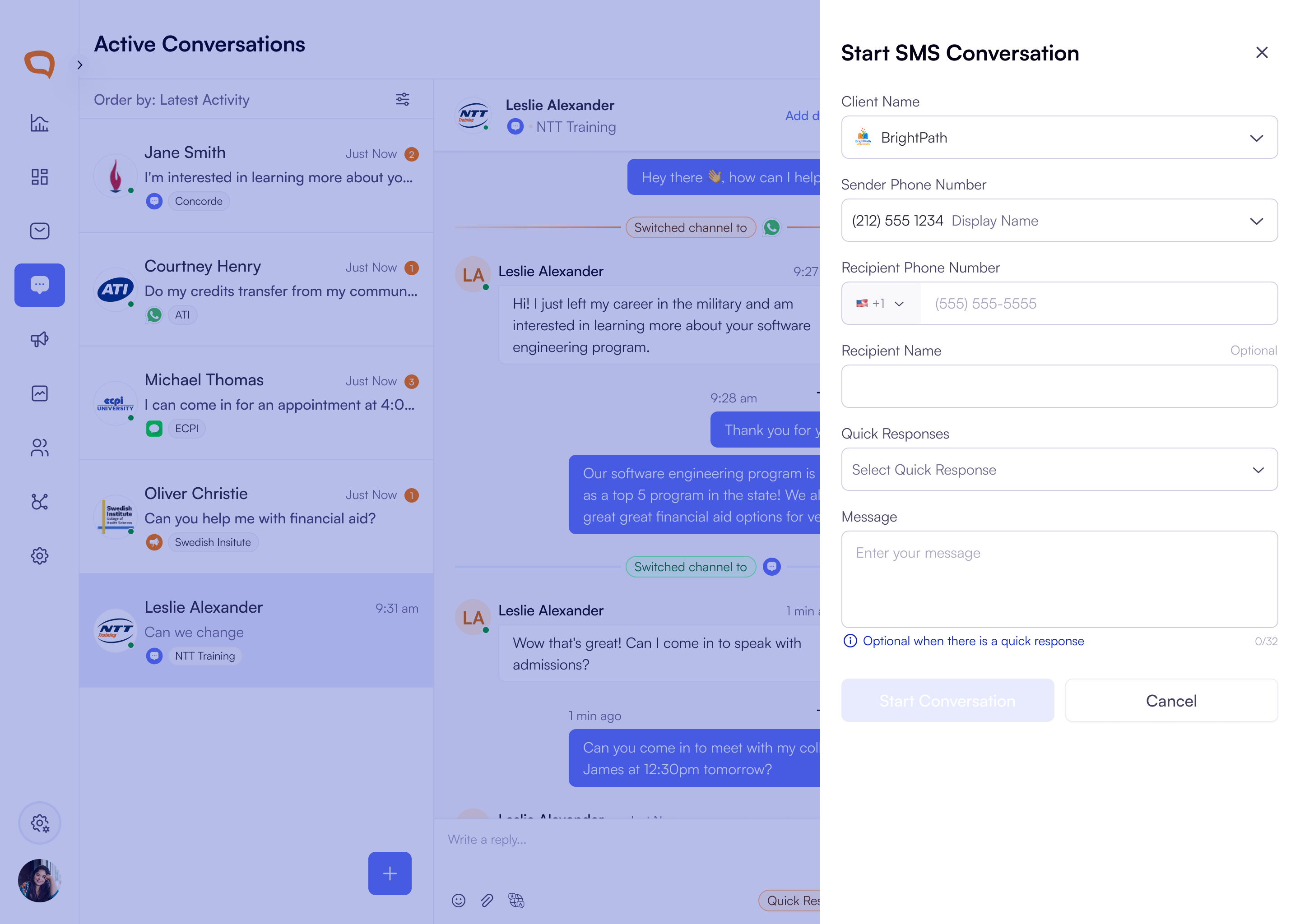
Outbound SMS from Active Conversations

  • Agents can now start a new outbound SMS conversation directly from the Active Conversations view, making it easier to proactively reach out without leaving their workflow.
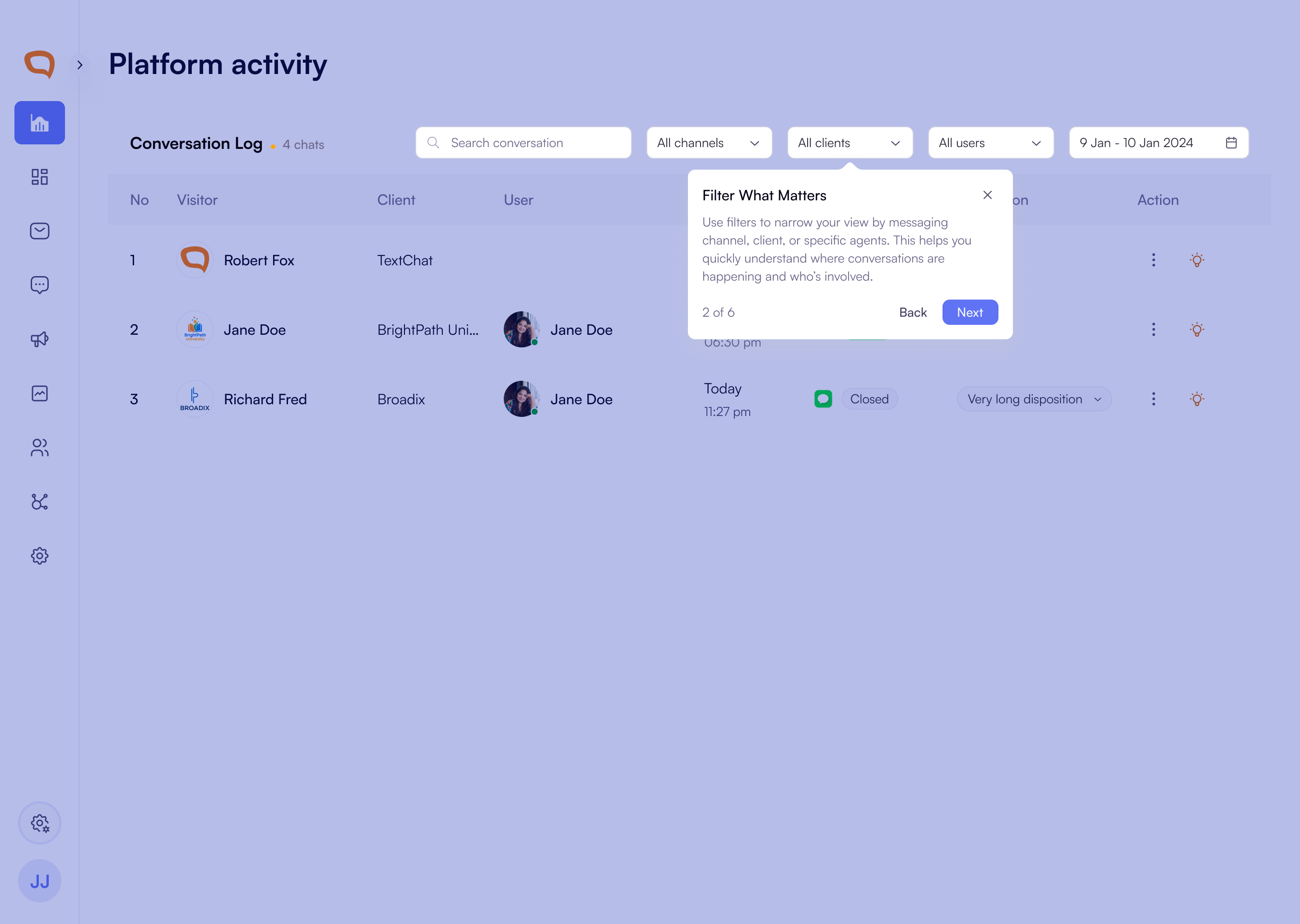
Guided Tours Across Key Pages

  • Users now get guided tours across key areas of the platform, making it easier to understand how to manage clients, users, and inbox workflows.

  • New guided walkthroughs are now available for the Client Details page, User Management, and onboarding flows, helping teams learn the product in context instead of figuring it out on their own.
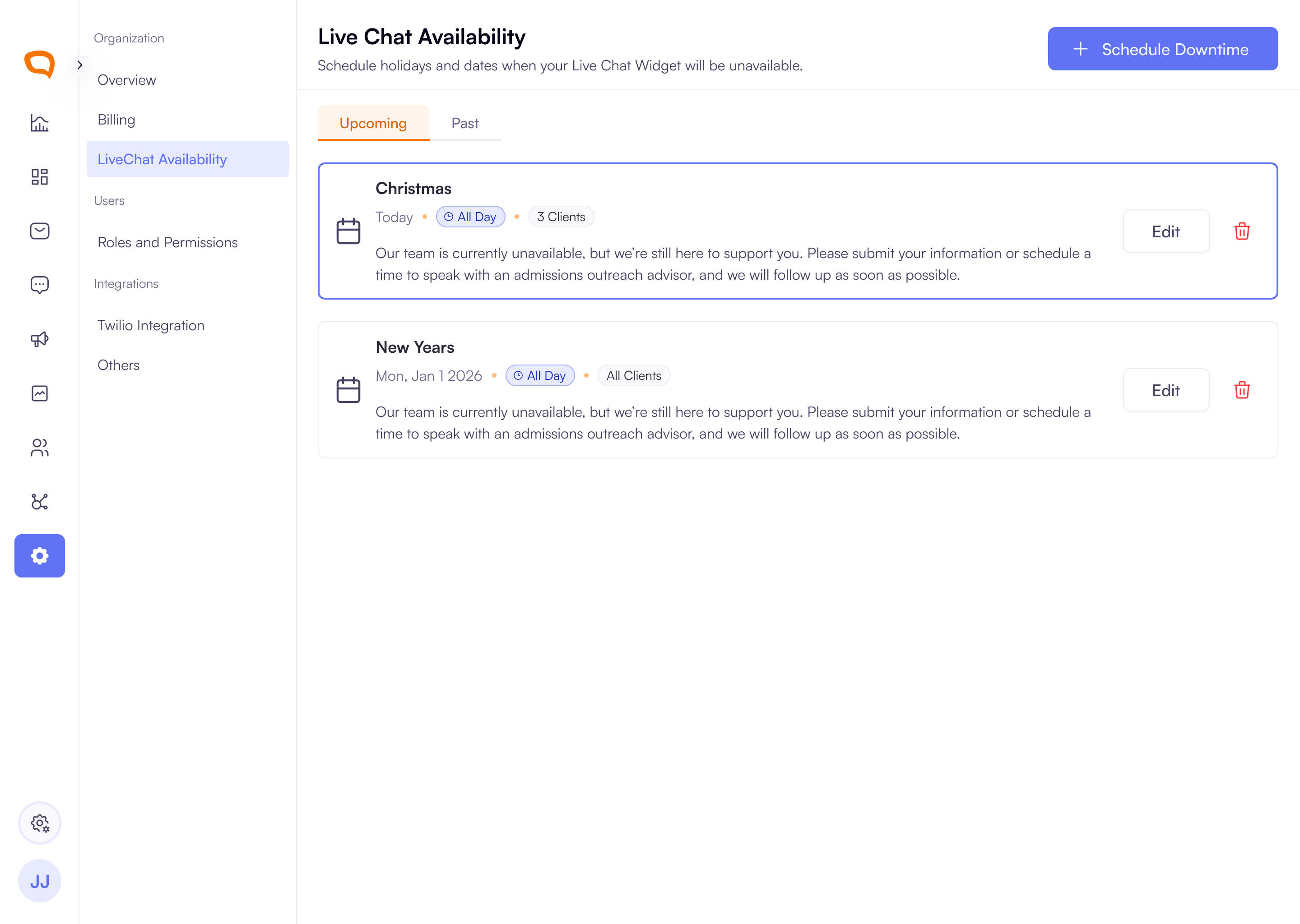
Live Chat Downtime Management

  • Super Admins can now schedule Live Chat downtime for planned outages or holidays.

  • You can also view, edit, and delete scheduled downtimes, making Live Chat availability easier to manage over time.

  • Clear empty states now appear when no downtimes are scheduled, so it’s easier to understand the current state and what to do next.
Improvements

  • Billing Permissions: Super Admins can now explicitly control who has access to billing through a dedicated Manage billing settings permission in role configuration.

  • Billing Details Management: Paid-plan organizations can now view and update billing address, billing contact, and tax ID information more clearly from the billing area.

  • Conversation Header Copy Updates: Conversation-ending actions now use clearer labels in the header, making it easier to understand what happens next.

    • End Conversation is now Close Conversation

    • Send transcript is now Send Transcript and Close

    • Discard chat is now Close Only

  • Recurring Payment Visibility: Organizations in paid plans now get clearer status information for ACH payments and better notifications when recurring payments fail, helping prevent avoidable service interruptions.

  • Agent Guidance During Service Interruptions: When messaging is unavailable, the platform now gives clearer context about why sending is blocked and what action is needed next.

  • Conversation Log: Organization users now see client logos instead of user initials in the conversation log, reducing confusion when working across multiple clients. Client Admins and Client Users will continue to see initials.

  • Free Trial End Notifications: Free trial users now receive clearer notifications before their trial ends, including reminders about upgrade timing and when account data will be permanently deleted if no action is taken.


Bug Fixes

  • Duplicate unsuccessful transfers are now reported more reliably, reducing confusion when the same failed transfer appeared multiple times.

  • Arc Browser now redirects correctly to the Mail app during billing and email-related flows.

  • Knowledge base links and attachments now load more reliably, including fixes for broken URLs, missing source names, and cases where updates only appeared after a page refresh.

  • Invited users and agents now appear correctly across invite flows, transfer lists, and user-management states.

  • Platform Activity now shows the correct chat state instead of marking queued chats as active.

  • Team management fixes resolved issues with deleting the wrong team and dropdown actions not behaving correctly.

  • Billing fixes resolved issues such as country/state mismatches, missing plan icons, banner alignment, and incorrect free-trial state behaviour.

  • Campaign and transfer reporting fixes addressed missing timeout visibility and dashboard UI inconsistencies.

  • Super Admin access and onboarding flows now behave more reliably, including invite acceptance, checklist issues, and permission-related edge cases.
Guided Onboarding, Billing Updates, Campaign Management & More

New Features

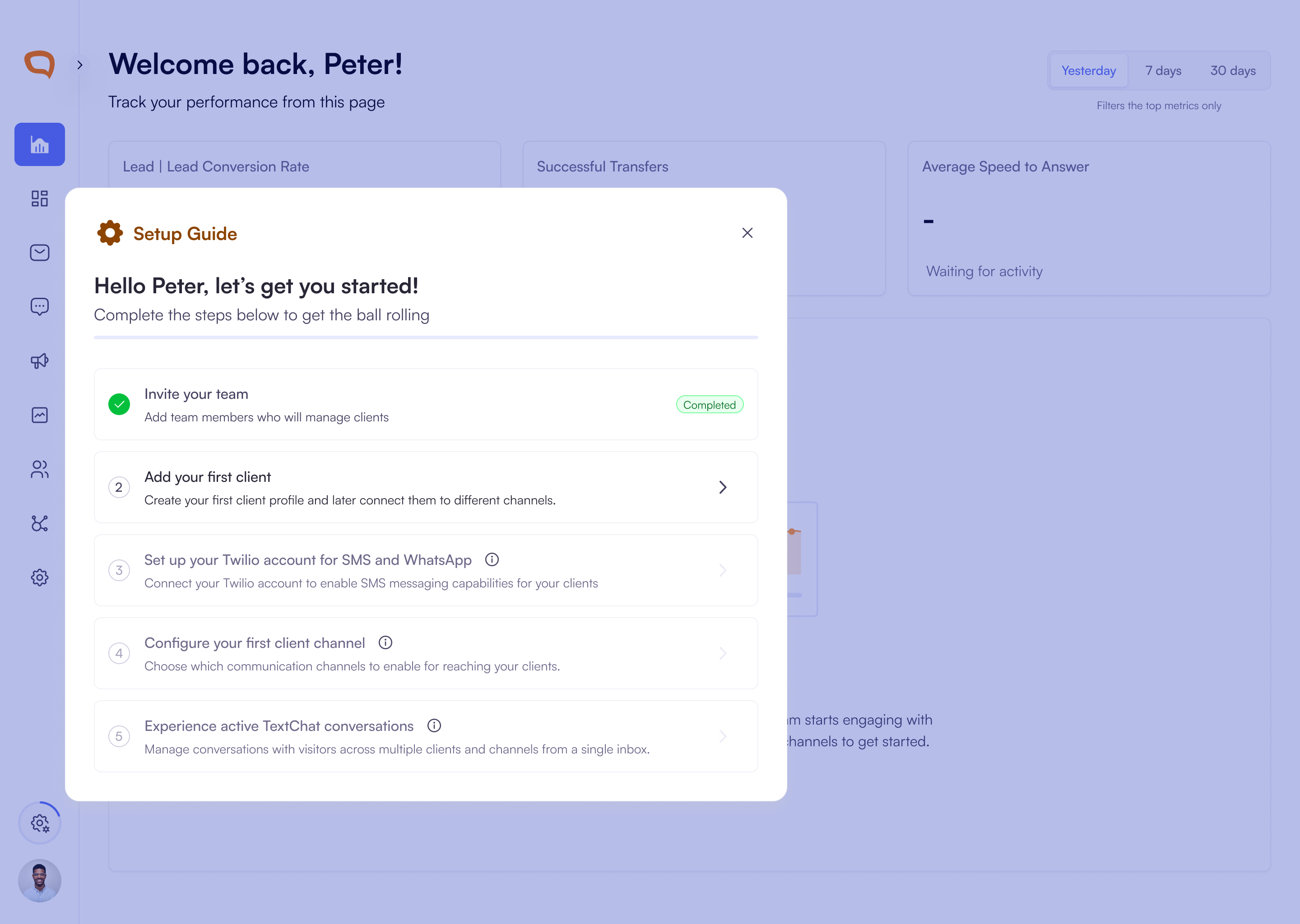
New Guided Onboarding Checklist

  • New organizations now see a built-in onboarding checklist that guides you through key setup steps such as inviting your team, adding clients, and connecting channels. Progress saves automatically and updates as each step is completed, helping you get fully set up faster.

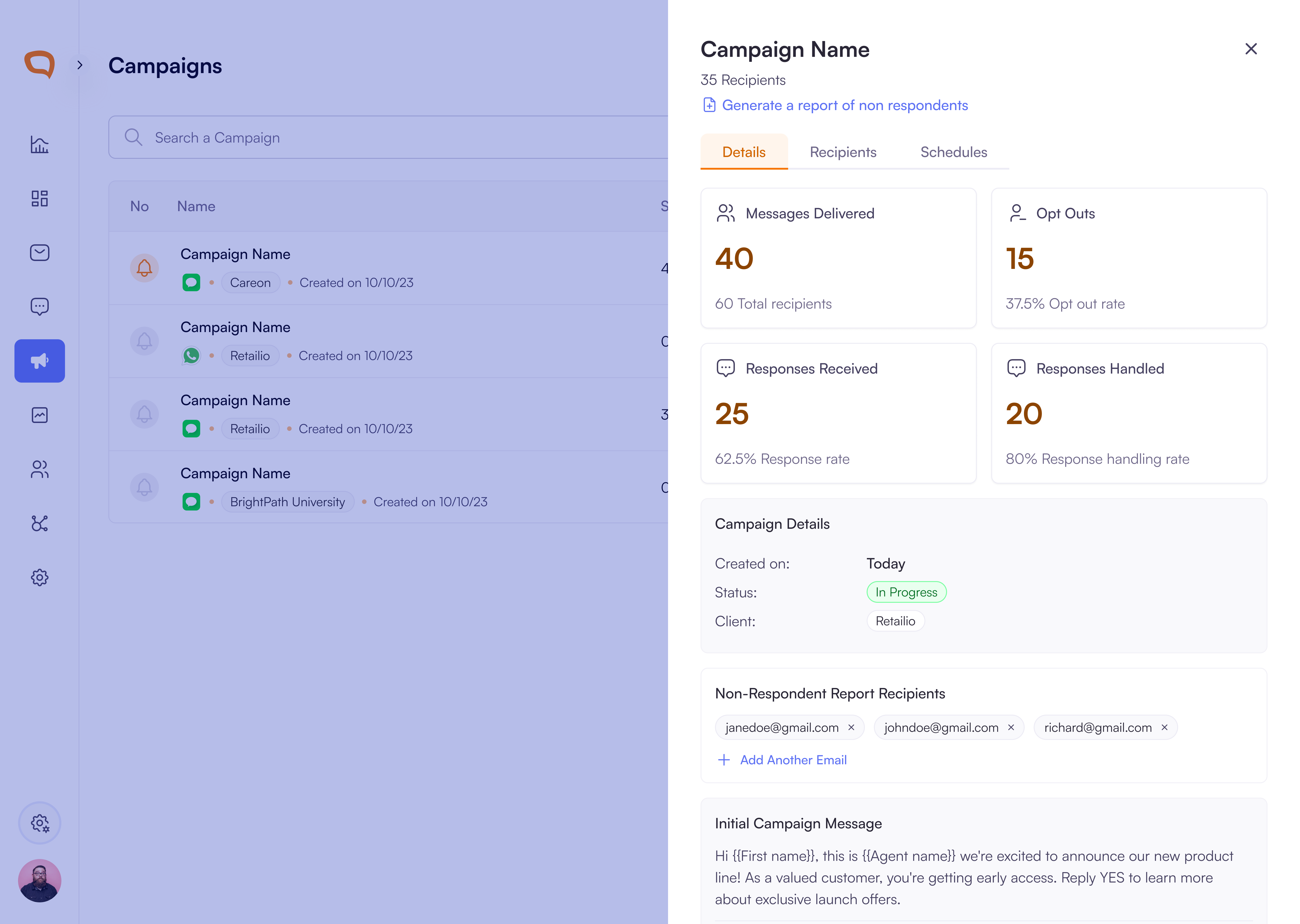
New Campaign Details Slide-Out Panel

You can now open a campaign slide-out panel to view and manage everything in one place without leaving the campaign list.

  • View campaign performance metrics including messages delivered, responses received, handled responses, opt-outs, status, and creation details.

  • Review scheduled follow-up messages with message previews, send timing, and next scheduled sends.

  • Switch instantly between Details, Recipients, and Schedules tabs to access campaign data and manage report recipients more efficiently.

Billing

New Free Trial Experience with Usage Tracking: You can now clearly track your free trial status, remaining days and message credit usage.

  • View a trial banner with countdown and Upgrade Now button.

  • Track message credit usage with a progress bar and channel breakdown.

  • Receive notifications when your trial is ending or credits run out.

  • Free trial organizations can create one client and continue viewing data even if messaging is paused.

Guided Billing Flow for Plan Upgrades: Upgrade from the free trial through a step-by-step billing experience.

  • Compare plans (Free, Basic, Professional, Enterprise) with pricing and included credits.

  • Choose monthly or annual billing and view per-channel pricing.

  • Add billing details securely via card or ACH.

  • Enable auto-replenishment to prevent running out of message credits.

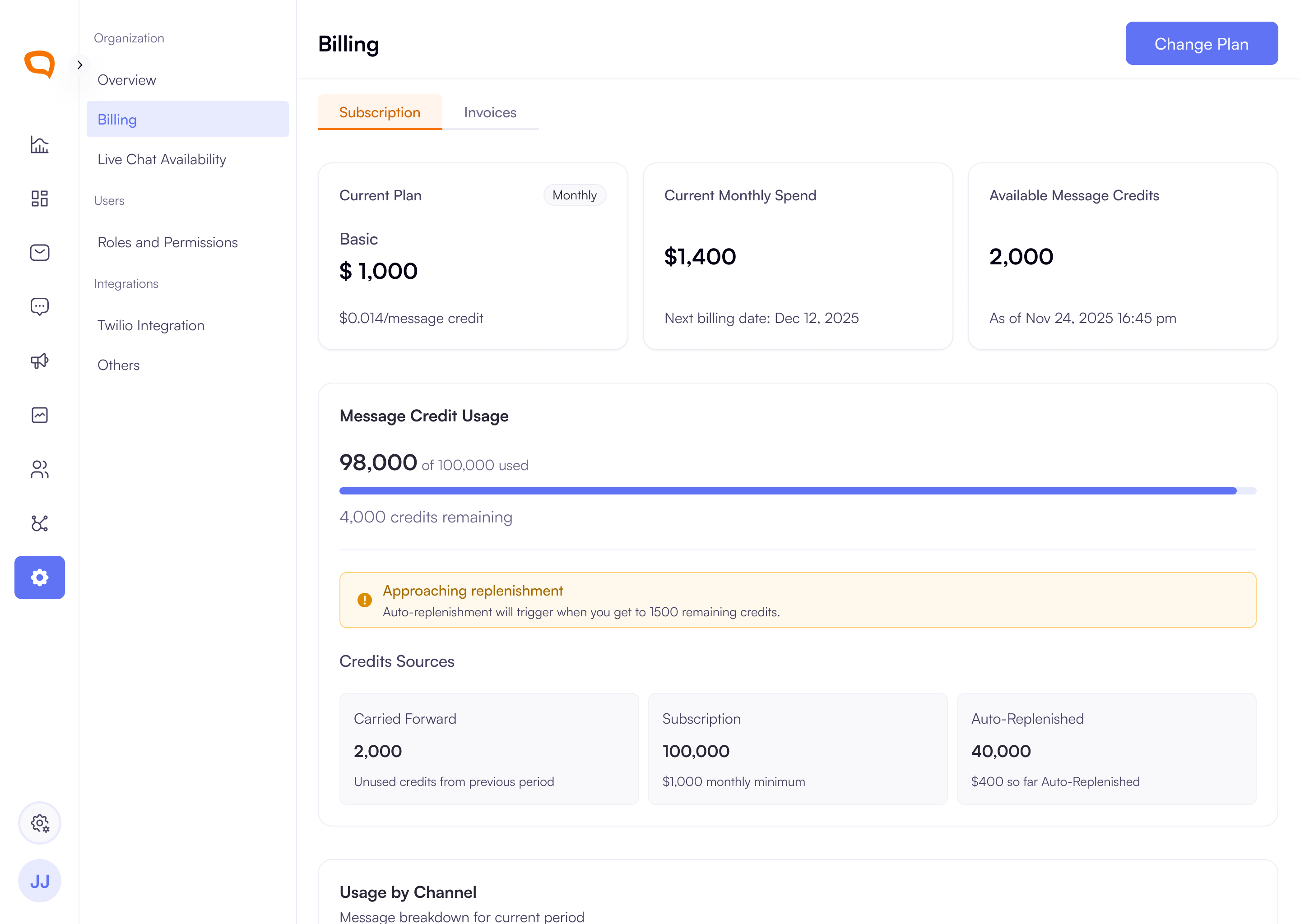
New Billing Overview - Credits, Usage & Payments: You can now manage subscriptions, credits, and payment methods in one centralized view.

  • Track credit balance, usage, and credit sources in real time.

  • View usage breakdown by channel including SMS, WhatsApp, Instagram, Facebook, LiveChat, Campaigns, and AI Agents.

  • Manage payment methods and set a primary payment option (card or ACH).

  • Configure auto-replenishment to automatically purchase credits when balances run low.

  • Purchase additional credits anytime using preset or custom amounts.

Smarter Notifications to Prevent Service Interruptions: Stay informed and take action before messaging is impacted.

  • Receive alerts when credits are low, payments fail, or action is required.

  • Messaging pauses when credits are exhausted and resumes once credits are added.

  • View real-time payment status and ACH verification updates.

Improved Plan Management & Subscription Control: Manage your subscription with clear visibility and control.

  • Compare plans and upgrade or downgrade through a guided flow.

  • View scheduled plan changes and cancel them before the billing date.

  • See your current plan, billing cycle, spend, and next billing date in one place.

Improvements

  • Onboarding Resumes Automatically: If you leave before completing setup, you’ll return to the exact step you last finished when logging back in. Progress is saved automatically, allowing seamless continuation.

  • Improved User Import Template with Role Selection: The downloadable import template now includes a dropdown for the Role column, defaulting to Agent and Super Admin roles to simplify assignment.

  • Client Logos in Platform Activity: Organization users now see client logos instead of user initials in Platform Activity, reducing confusion when working across multiple clients. Client Admins and Client Users will continue to see initials.


Bug Fixes

  • Email Case Sensitivity Fix: Email addresses are no longer treated as case-sensitive during signup or login.

  • Password Visibility Fix: The password visibility toggle now functions correctly during signup. Your password will now remain visible when the eye icon is selected.

  • Improved Notification Targeting: Queued notifications are delivered only to Super Admins associated with the relevant client or organization.

  • Transfer Timeout Visibility: Transfers that fail due to timeouts are now displayed as Failed Transfers in the Transfers Dashboard for clearer reporting.

Organization onboarding, Bulk User Upload and Other Improvements

New Features

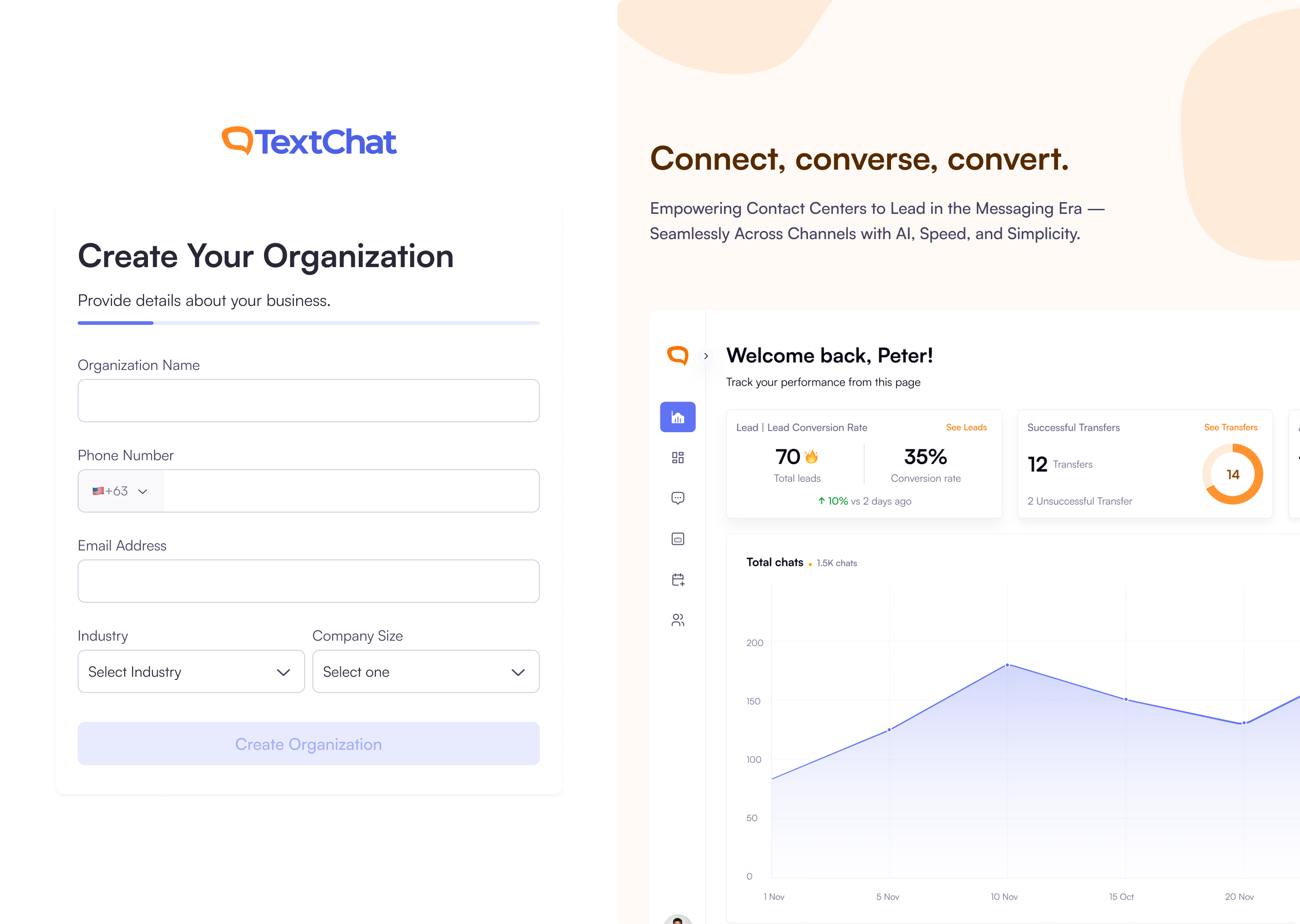
New Guided Account and Organization Setup Experience

  • We’ve introduced a completely new onboarding flow to help new organizations get started quickly and confidently. You can now create your TextChat account, verify your email, set up your organization, and invite teammates: all in one seamless, step-by-step experience.

  • During signup, you’ll enter your basic details and receive real-time password validation to ensure your account is secure. After verifying your email with a 6-digit code, you’ll be guided to create your organization by providing essential business information. You can then invite up to three colleagues to join you before completing setup.

  • Once everything is ready, you’ll see a confirmation screen and can jump straight into the dashboard to begin using TextChat.

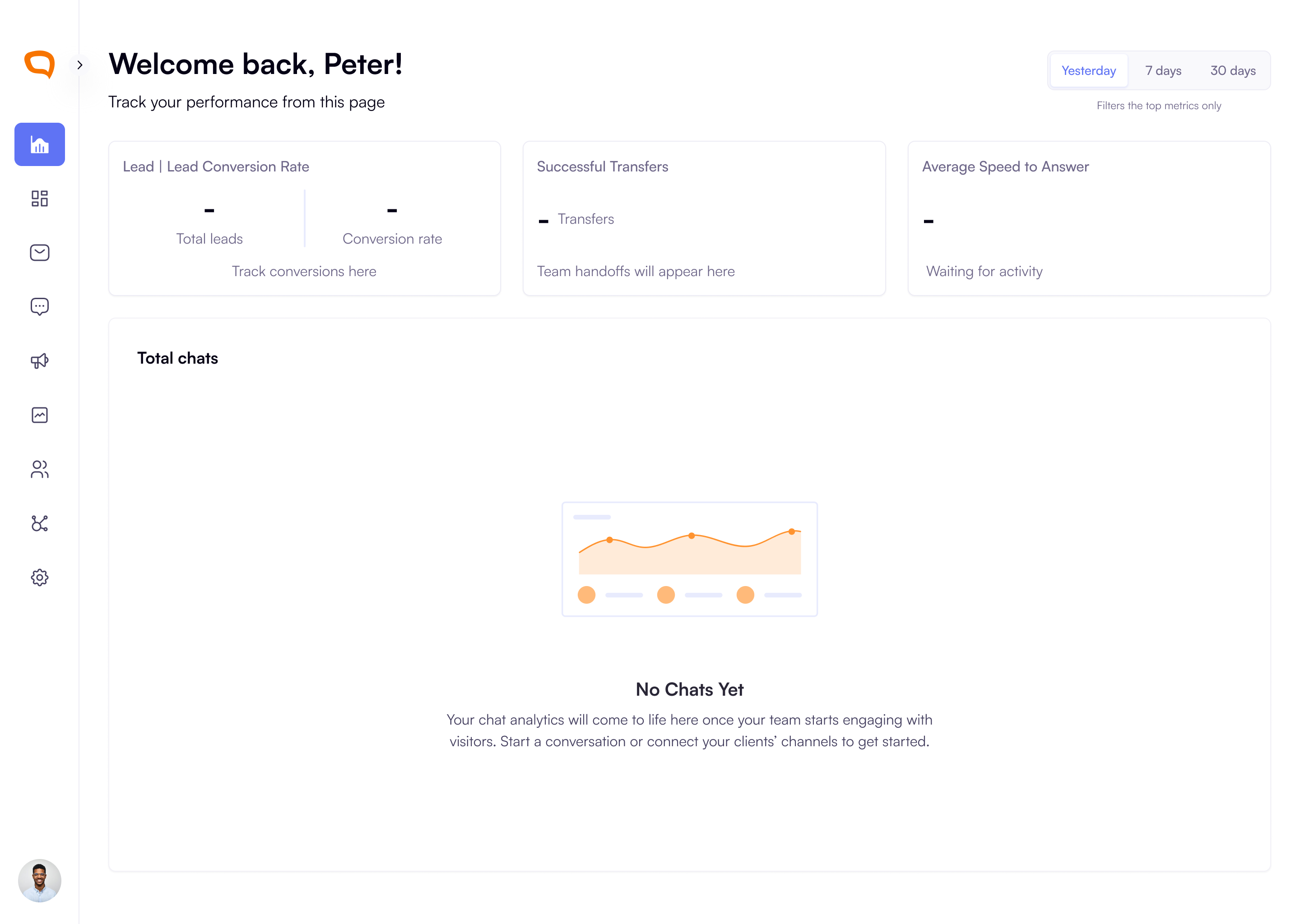
New Empty States to Guide Your First Steps in TextChat

  • We’ve added helpful empty states across the platform to make your first login experience clearer and more intuitive. Your dashboard now welcomes you with personalized guidance on what to do next.

  • You’ll also see clear empty states in Active Conversations and Platform Activity, campaigns that explain why no messages appear yet and what actions you can take, such as connecting clients, connecting Twilio Accounts or adding channels.

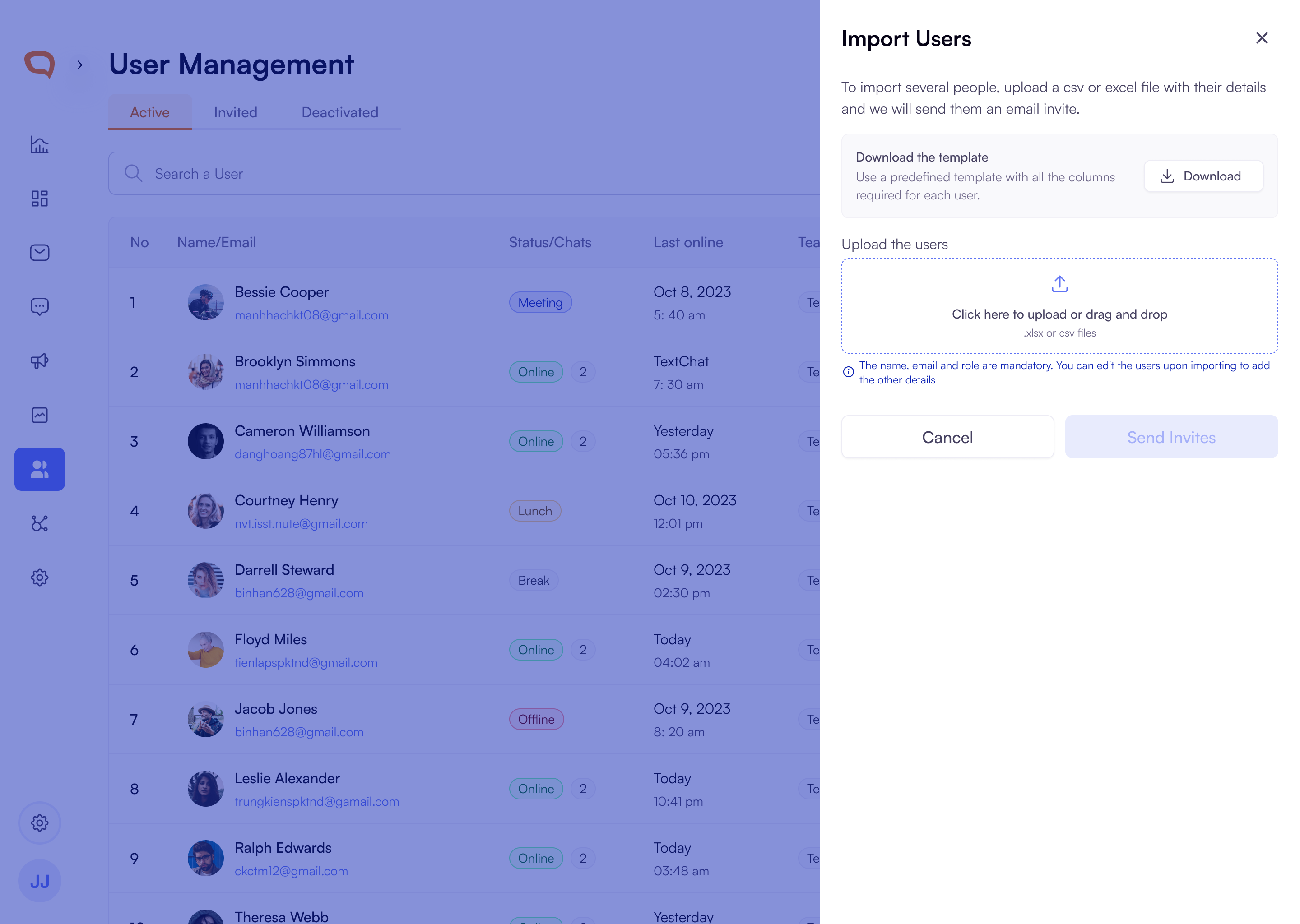
Bulk User Import Now Available in User Management

  • You can now easily bring multiple users into your workspace with the new Import Users tool. From the User Management screen, you can download a ready-made Excel template, fill in user details, and upload the file through a simple drag-and-drop panel. We validate your file automatically and highlight any issues such as, invalid or duplicate emails, so you can fix them before sending invites.

  • User Management now includes new tabs for Active, Invited, and Deactivated users, allowing you to clearly track pending invitations. From the Invited tab, you can resend invites or revoke an invitation at any time, giving you complete control over who joins your organization.

Text Campaign Recipient Templates:

  • When creating campaigns, you can now download a ready-made template directly from the Recipients List section. This is to help you upload recipients without errors. The file includes all common columns for first name, last name, email, phone number, and program name.

Userback.io Integration for Faster Bug Reporting:

  • Userback.io has been integrated into the platform, allowing clients to capture and share screenshots and recordings directly within TextChat. This streamlines troubleshooting, reduces back-and-forth communication, and helps engineers diagnose issues more efficiently.

Text Message Scheduling and follow ups:

  • Message Delivery Window: To help you stay compliant with U.S. state regulations, scheduled and follow-up messages will now only be sent between 8 AM and 9 PM in each recipient’s local time.

Improvements

  • Knowledge Base Now Available Across All Channels: Fixed an issue where client knowledge base links were not appearing in conversations. Linked knowledge bases now attach automatically across all channels including SMS, Live Chat, WhatsApp, Instagram, and Facebook, and the button is hidden when no source exists.

  • Client Logos Added to Conversation Log for Organization Users: The conversation log now displays the client’s logo instead of user initials for Organization users such as Agents and Super Admins, reducing confusion when responding across multiple clients. Client Admins and Client Users will continue to see their initials.

  • Role Descriptions Added for Easier User Assignment: Super Admins can now add a description when creating or editing roles, making it easier to understand each role’s purpose.

  • Ability to Disconnect Unused Twilio Accounts: You can now disconnect Twilio accounts that are no longer linked to any clients.

  • Role Descriptions Now Visible During Assignment: When assigning roles, you’ll now see a brief description of each role to help you understand its purpose. You can also add or edit these descriptions when creating custom roles.

Bug Fixes

  • All Connected Channel Logos are Visible in Client Management: You can now see all the correct channel logos displayed under Client Management whenever a channel is connected.

  • Multichannel Setup Reliability Fix: Resolved an issue that prevented users from adding channels during multichannel widget setup. Connected Instagram, Facebook, WhatsApp, and SMS channels now appear correctly and can be configured without interruption.

  • User Profile Update Button Fixed: Addressed an issue where the update button failed to activate when modifying user details. The button now correctly enables whenever changes are made.

  • Improved SMS Conversation Handling: New SMS messages received after 24 hours will now correctly start a fresh conversation instead of reopening an old one. These new conversations are automatically assigned to an available agent, ensuring faster responses and cleaner conversation history.

  • Instagram Message Routing Fix: We’ve fixed an issue where new Instagram messages were sometimes appearing in the wrong conversation. Messages will now show up in the correct thread so you can continue chats without any confusion.

  • Conversation Queue Improvements: We’ve streamlined how conversation queue notifications work to make things less noisy and easier to manage. You’ll now receive only one toast notification when a conversation enters the queue, and only Super Admins who belong to that specific client or organization will be notified.

Earlier updates